Changelogs
Stay up to date with the latest changes and enhancements.
Stay up to date with the latest changes and enhancements.

Stay up to date with the latest changes and enhancements.
30. Jun 2026
Share
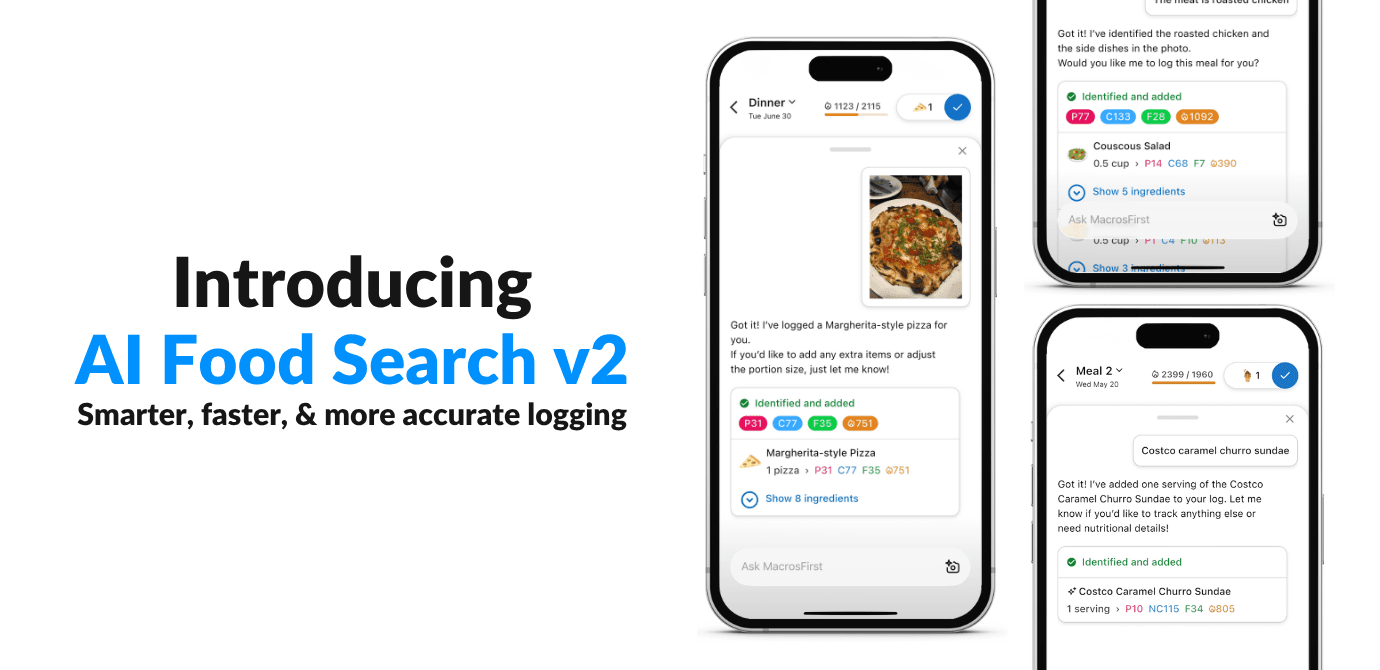
We rebuilt AI Food Search from the ground up, and the difference is huge. The new AI Food Search is dramatically more accurate at finding the foods you eat, whether you type them, say them, paste a recipe, or snap a photo.
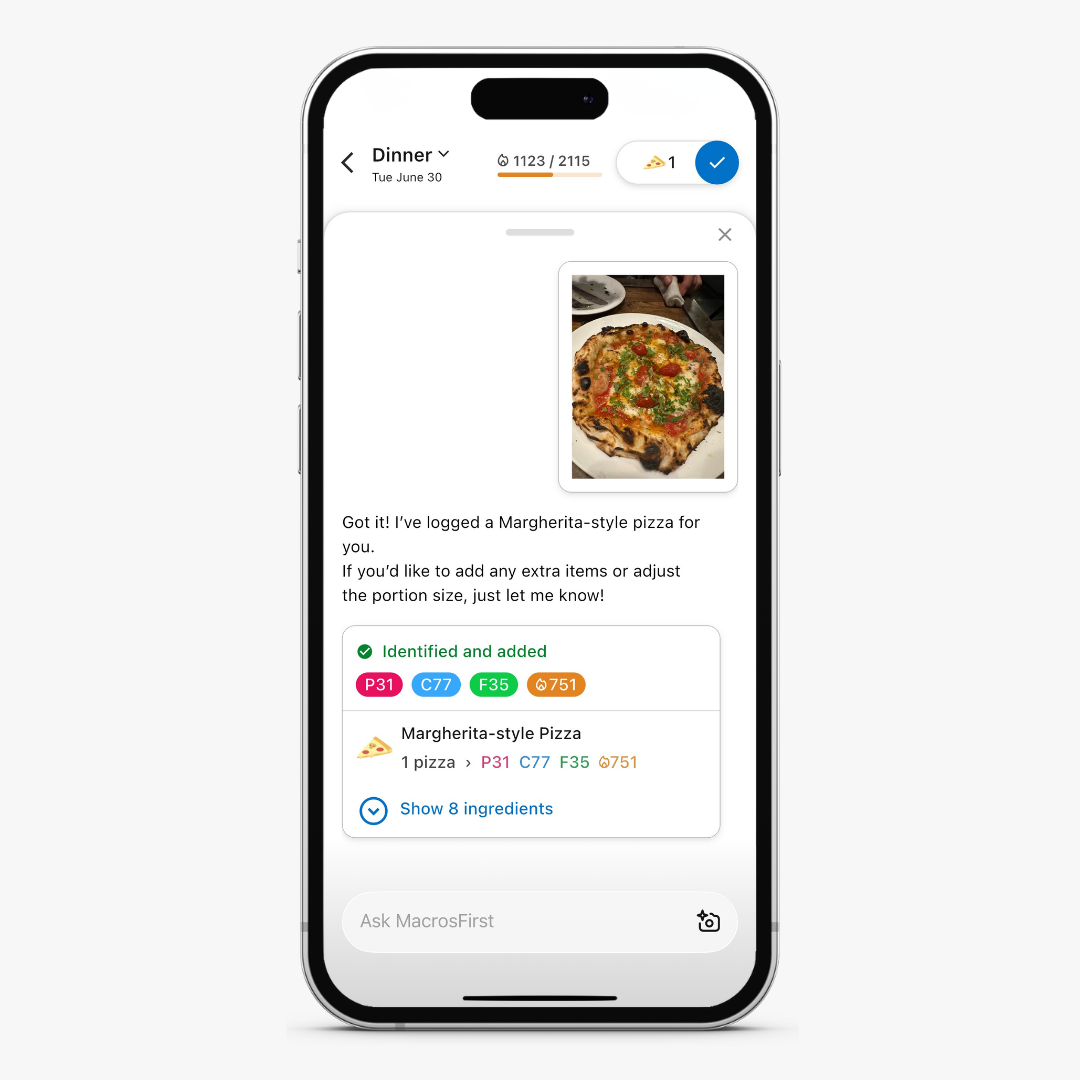
MacrosFirst uses AI to do what it's great at: recognizing what you ate. We don’t use AI to do what it’s not good at: inventing the nutrition data of the foods it finds. Instead, MacrosFirst AI pulls your nutrition numbers from real foods in our 100% verified food database. No AI hallucinations.
That's the opposite of most AI tracking apps, which also rely on AI to imagine the nutrition data. That's why their numbers so often don't match reality, and ours do.
With MacrosFirst AI food search, you get:
Smarter matching. AI Search now searches our entire database, including Core Foods, and reviews the full search results for each item instead of just grabbing the first result.
Ingredient breakdown. Snap a photo, and AI Search identifies each dish, then breaks it into its component ingredients — even the ones you can't see, like the oil in a stir-fry — and adds them up. You can add a note about what's in the photo (like the cacao nibs on your yogurt) to sharpen the results, and you can see exactly how it got there and edit or split out every ingredient.
Nothing falls through the cracks. If a food isn't in our database yet, AI Search creates it for you by researching it on the web, and flags it with a  so you always know what came from our verified data and what was AI-generated.
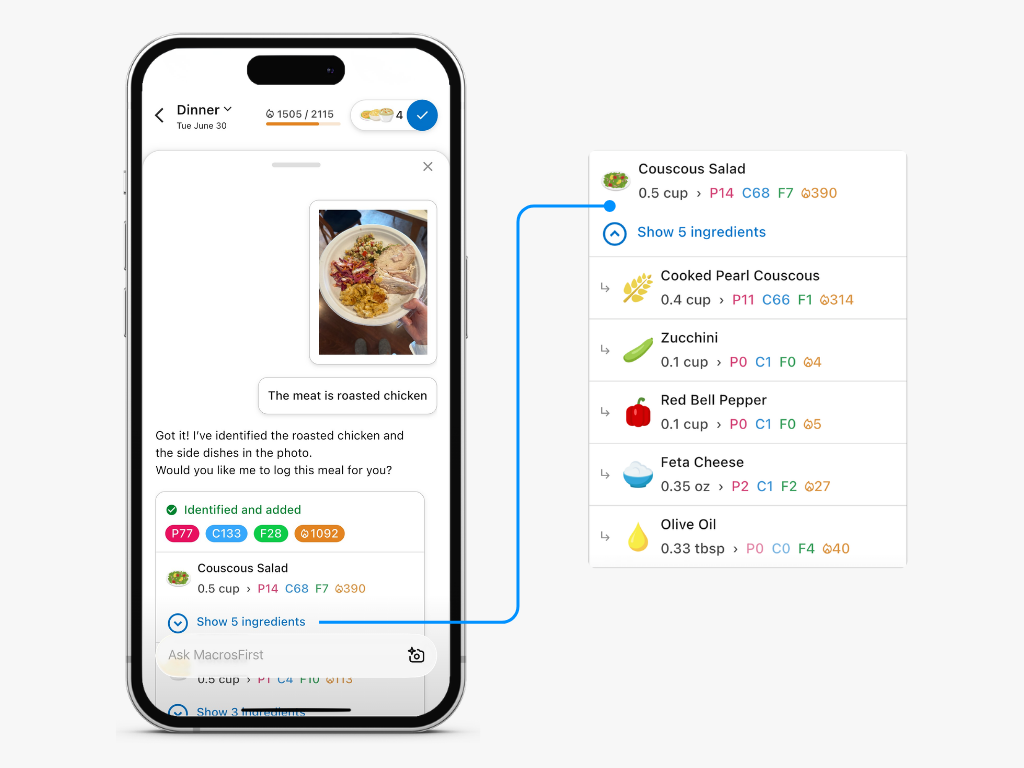
More accuracy, more transparency, and less manual entry. You get to see exactly how AI Search arrived at your numbers, so you can trust the verified data behind them.
For the full details about AI Food Search, how it works, and how to get the most out of it, check out:
AI Search
Log foods in seconds with voice, text, a pasted recipe, or a photo — powered by AI and our 100% verified food database.
This is the first step in a much bigger vision for MacrosFirst AI. Coming soon: recipe recommendations, nutrition insights that answer questions like "what am I low on?", deeper reporting, and a conversational AI assistant built right into the app.
Try it now — tap the or  in Food Search.
19. Jun 2026
Share
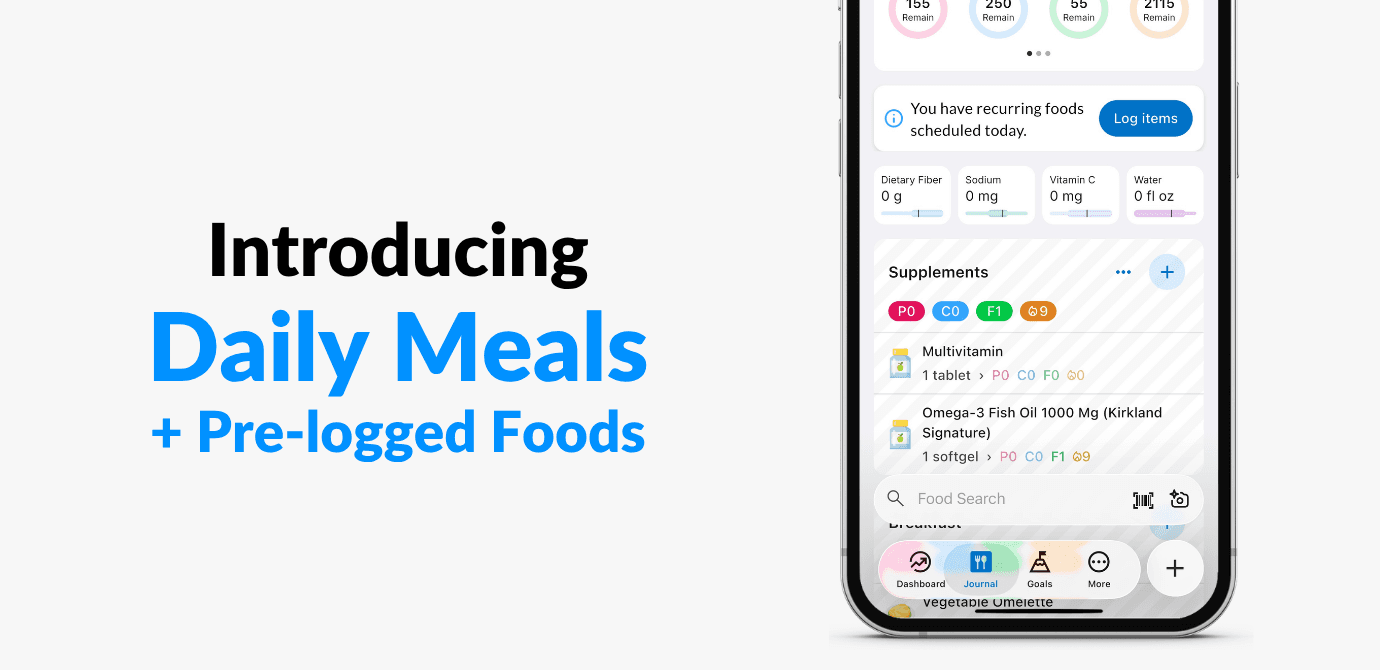
Meet Daily Meals — the easiest way to set your day up before it even starts. Build your meal schedule once, and it shows up in your Journal automatically, every single day. Premium users can also schedule daily foods that automatically repeat each day.
You'll now find your recurring meals in their own home under More > Daily Meals (they used to live inside your Daily Goal). Everything you already love still works exactly the same: name your meals, set optional targets, and shape your day around how you actually eat.
Premium members get two brand-new ways to save time every day:
A unique schedule for every day of the week
Make Tuesday look nothing like Wednesday. Premium members can now build a different set of meals for each day of the week — ideal for training days, rest days, fasting days, or however your week really runs.
Recurring foods that log themselves
This has been one of your most-requested features, and it's here. Add the foods you eat every day — your go-to breakfast, your daily supplements — straight to your recurring meals. They appear in your Journal automatically, ready to log with a single tap. If you eat the same things each day, this is a genuine, every-morning time saver.
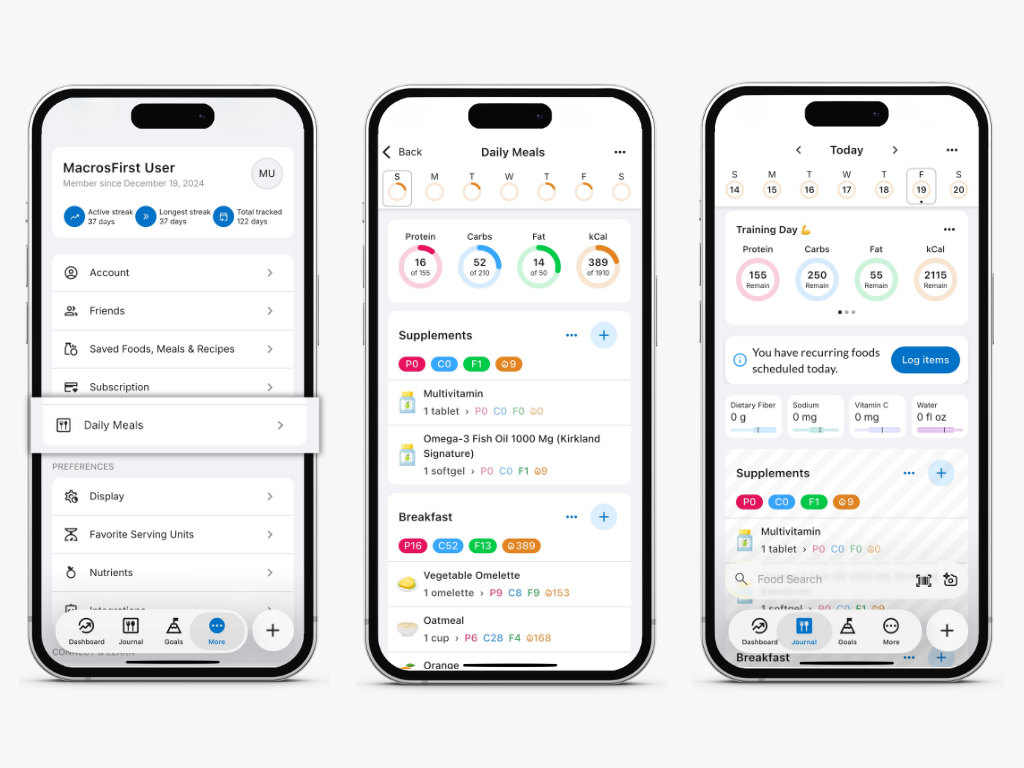
Never tried Premium? Now's the time.
New members get a 7-day free trial. Set up your daily meals and foods once, then feel the time savings every single morning. Open More > Daily Meals to give it a try.
To learn more about customizing your Daily Meals, check out:
Daily Meals
Build a recurring schedule of meals — and foods — that appears on your Journal automatically
30. Jan 2026
Share
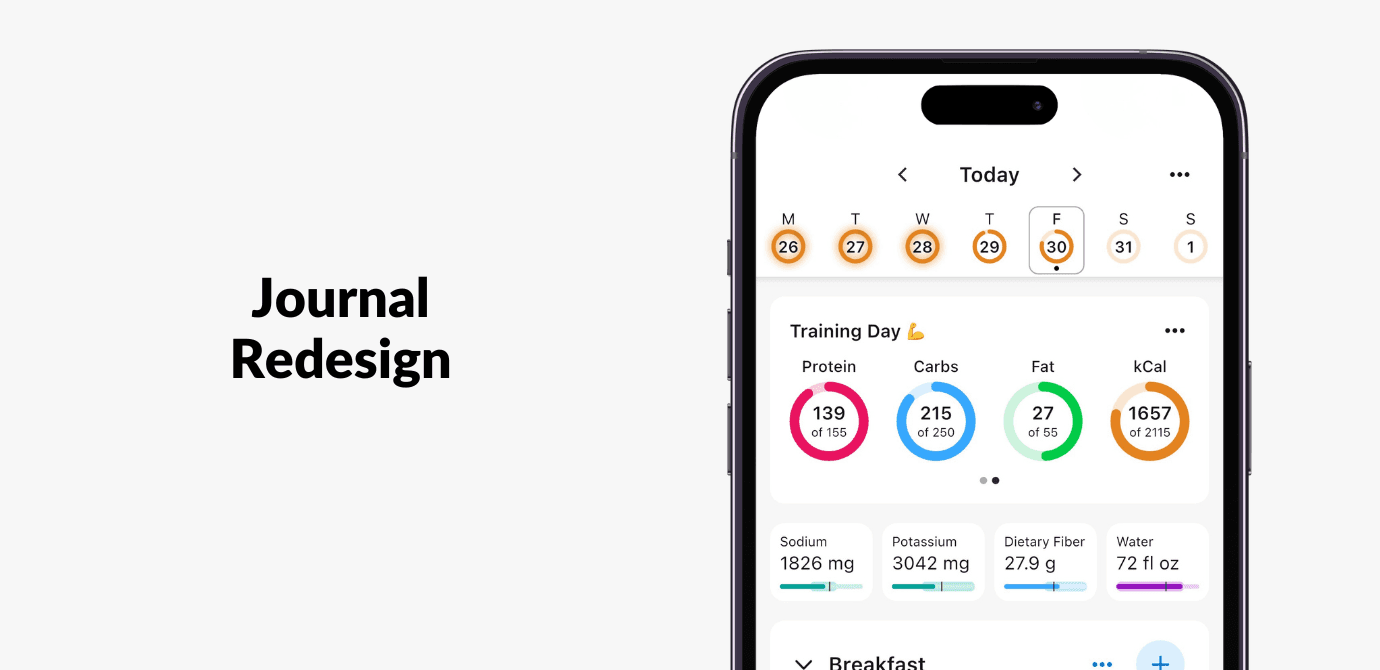
In this update, you’ll notice the Journal looks a bit different, with a more modern design focused on making daily tracking faster, easier to navigate, and more informative at a glance.
More intuitive navigation
Swipe left or right on the Journal to move between days.
Jump to specific dates or back to today more easily with the redesigned calendar.
More insight at a glance
See daily achievement of calorie targets in the calendar.
Pinned micronutrients in your Journal now show progress-to-goal. You can also tap on any micro to view its full nutrient report.
In this redesign, we shifted how progress is shown, moving away from binary indicators like  s and
s and  s toward a more informative, neutral view of your day.
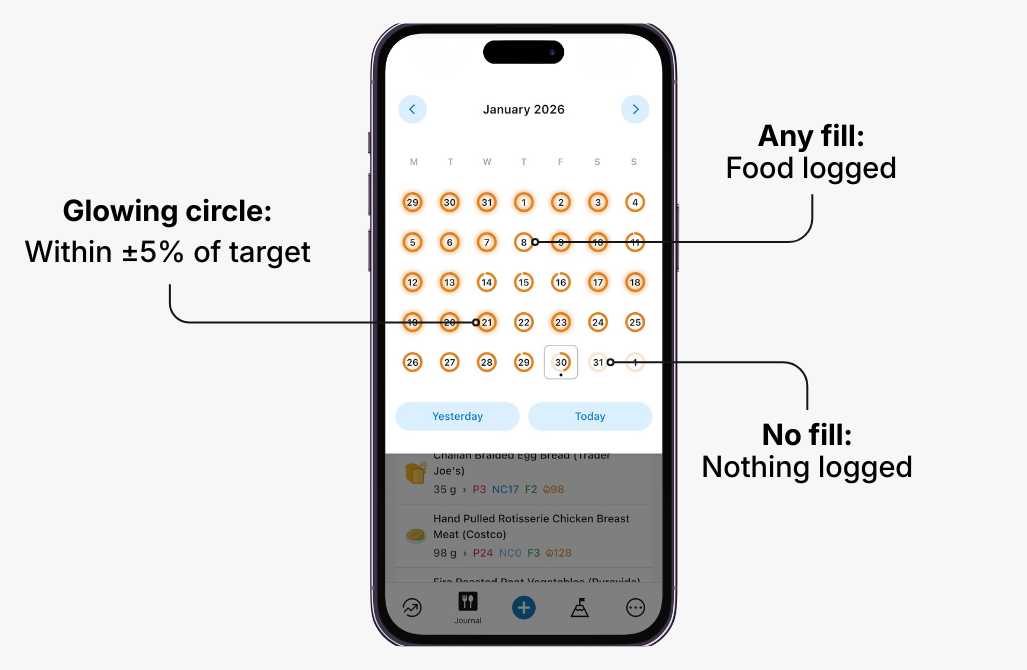
How the progress indicators work:
Any fill in the progress circle means food was logged that day. This replaces the and has the added benefit of showing you how close you are to your target, not just that you logged something on that day.
A glowing progress circle indicates you’re within ±5% of your calorie target. This replaces the .
No fill in the progress means that nothing was logged. In the old design, this would be the same as a date with neither a nor .
Additional Improvements
Log water directly from the bottom “+” button for quicker daily tracking.
New meal-level nutrient reporting, to view all nutrients per meal (including fiber!) for Premium users.
Recipe icons now display a collage of the recipe’s top ingredients.
New lock screen widget shortcut for logging water.
25. Aug 2025
Share
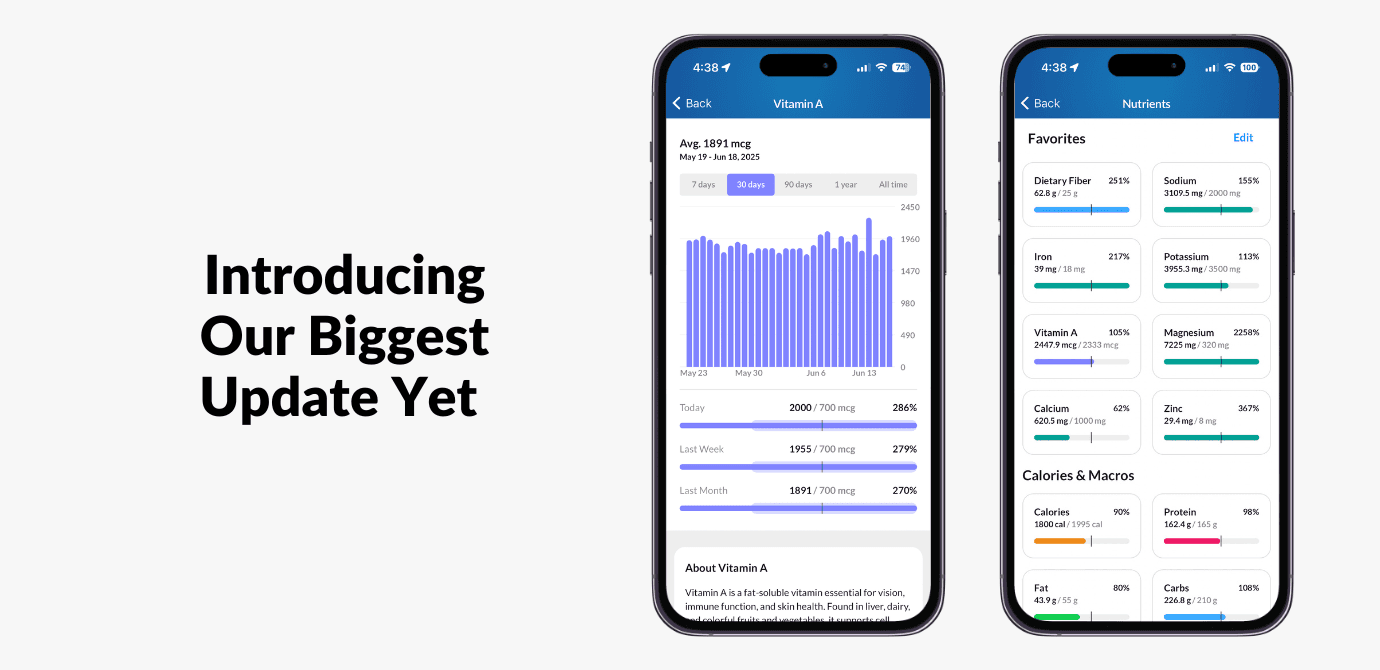
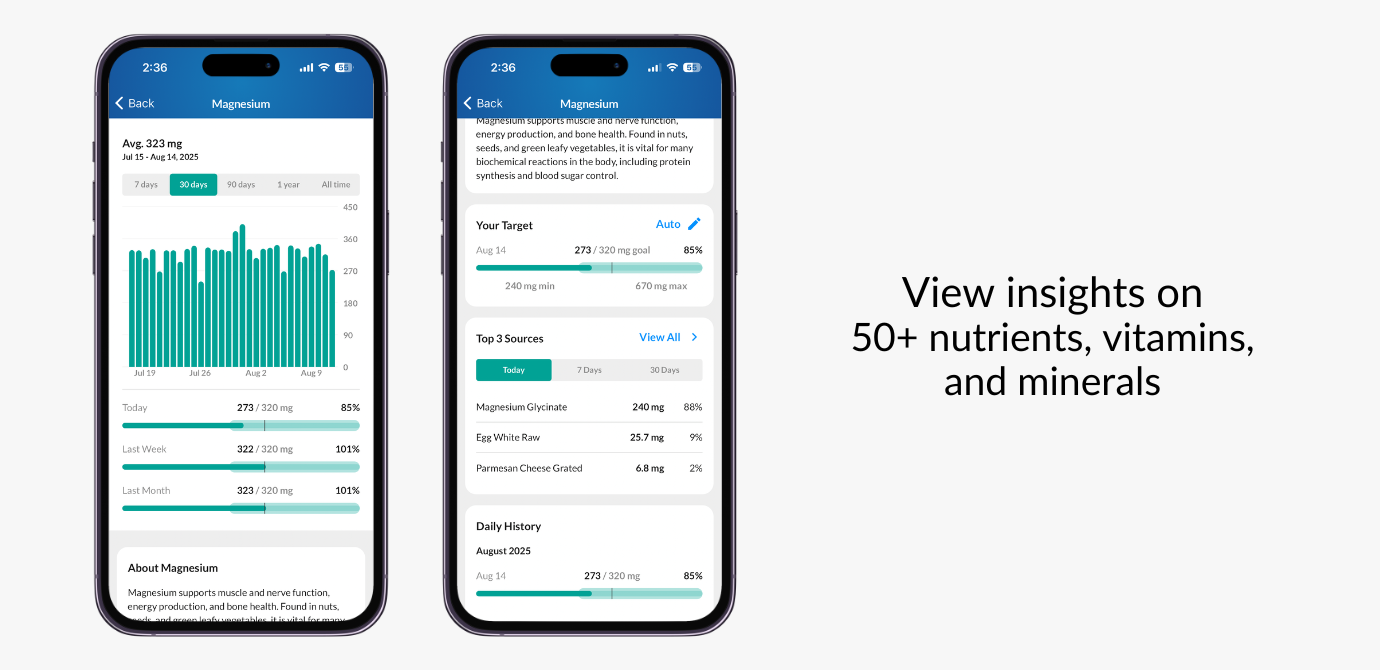
We’ve always been laser-focused on making macro tracking simple, accurate, and fast, and now we’re bringing the same power to your micronutrients. With our biggest update yet, you can now track 50+ vitamins, minerals, and other key nutrients to get a more complete picture of your nutrition, along with a completely reimagined food logging experience.
Read on for a detailed breakdown of what’s new in this app update and a preview of what’s coming very soon.
From the Dashboard, you can now access the all-new Nutrients section. Here, you’ll find:
Detailed daily breakdowns of each nutrient
Interactive charts to visualize trends over any time period
Top food sources so you know exactly where your nutrients are coming from
Daily targets automatically set using guidelines from American and European government health authorities to give you a science-backed starting point (customizable targets coming soon)
Pin your favorite nutrients to the Dashboard for quick access
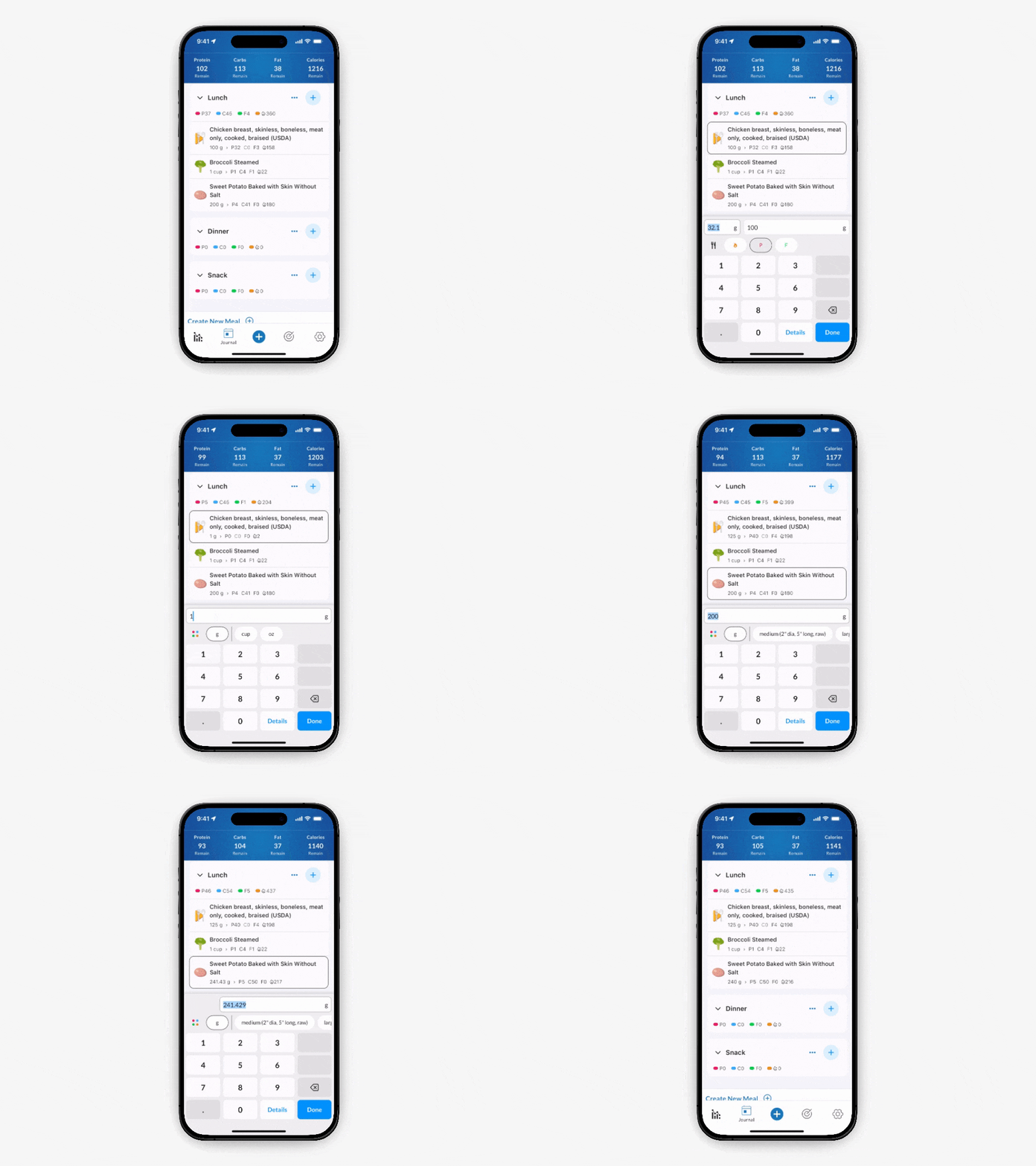
We totally redesigned the serving size selector so you can log foods faster in your desired serving size from anywhere in MacrosFirst. New capabilities include:
Auto serving size calculator – Automatically portion foods by any nutrient, not just macros.
Favorite Serving Units – Pin your go-to serving units (like grams or cups) so they’re always at the top of your selector for quick access.
Change Serving Units on the Dashboard – No longer do you have to navigate to the food details page to change the serving unit.
That’s it for now. Happy tracking!
Jacob
Founder, MacrosFirst
07. May 2024
Share
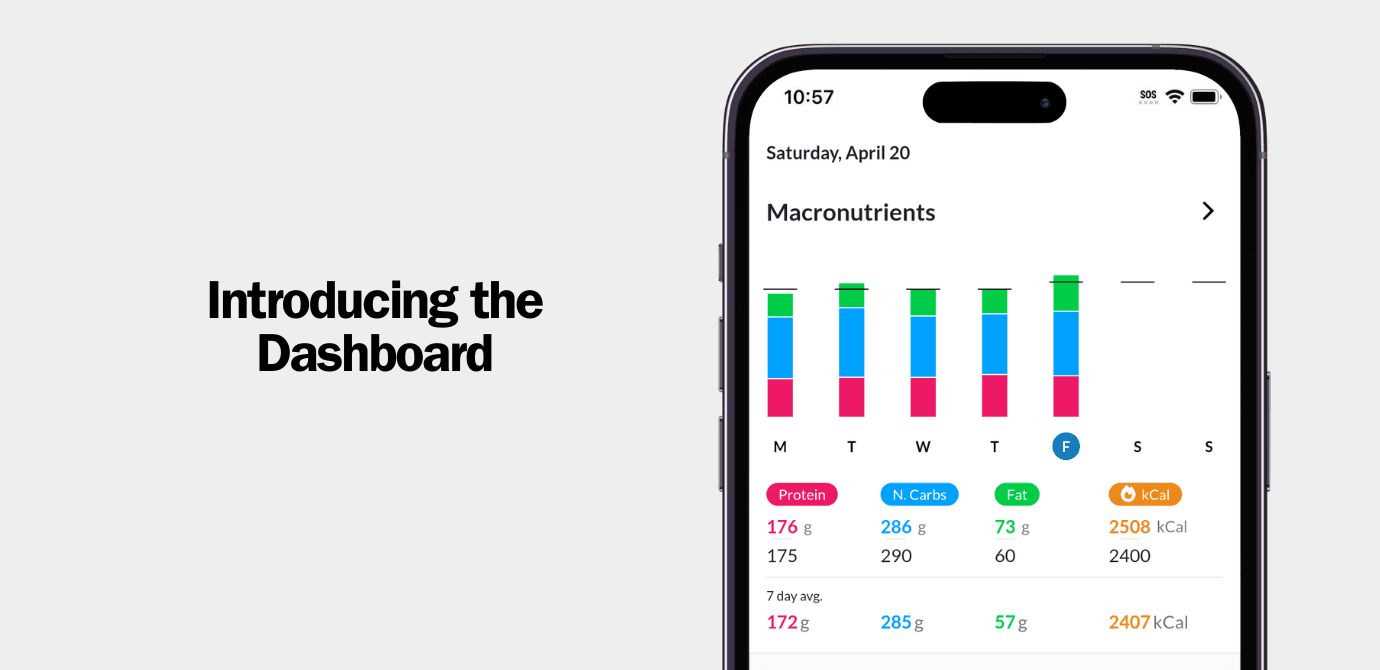
The dashboard contains charting with your recent nutrition and body weight trends. You can tap into each chart to enter an interactive reporting experience where you can view your trends and averages over any period of time.
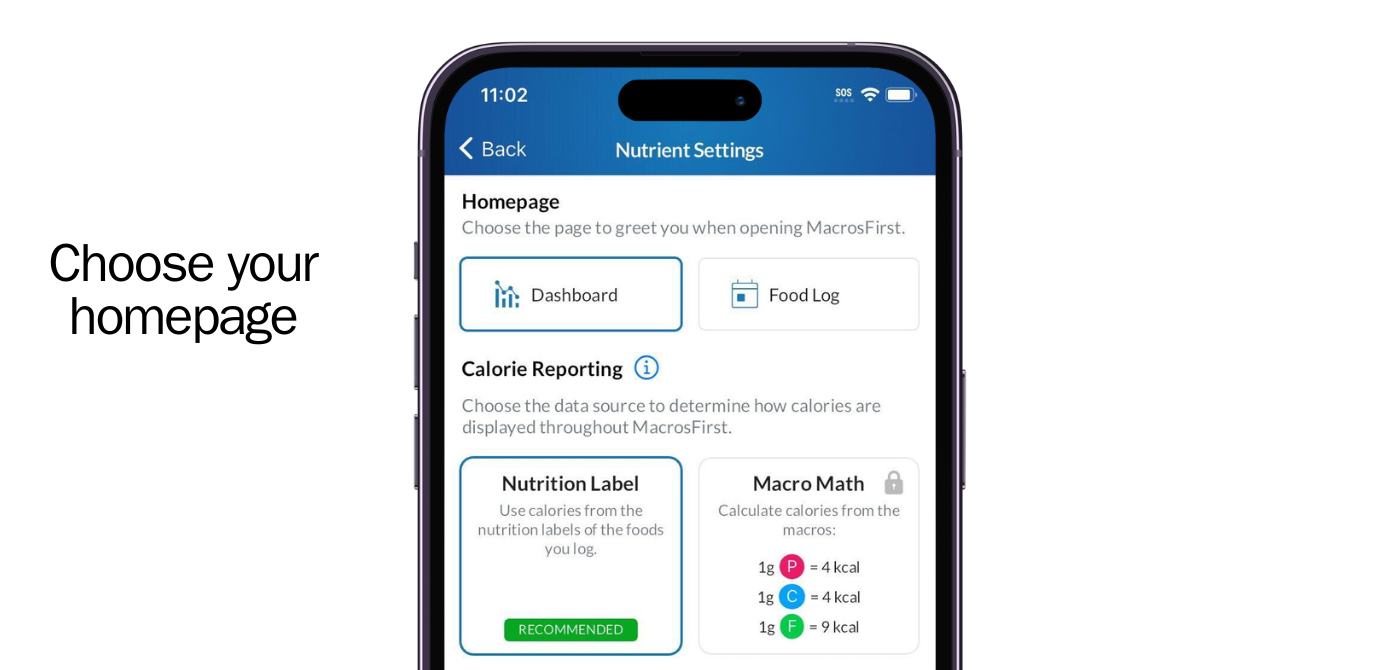
You can also choose whether you want the dashboard to be your home screen in MacrosFirst or if you want to keep the food log as the default screen that greets you when opening MacrosFirst.
We will be adding additional reporting capabilities to the Dashboard including micros, custom charts, and habit tracking soon.
Perhaps the biggest change is a reorganized navigation experience and the introduction of the universal add (+) button with quick search.
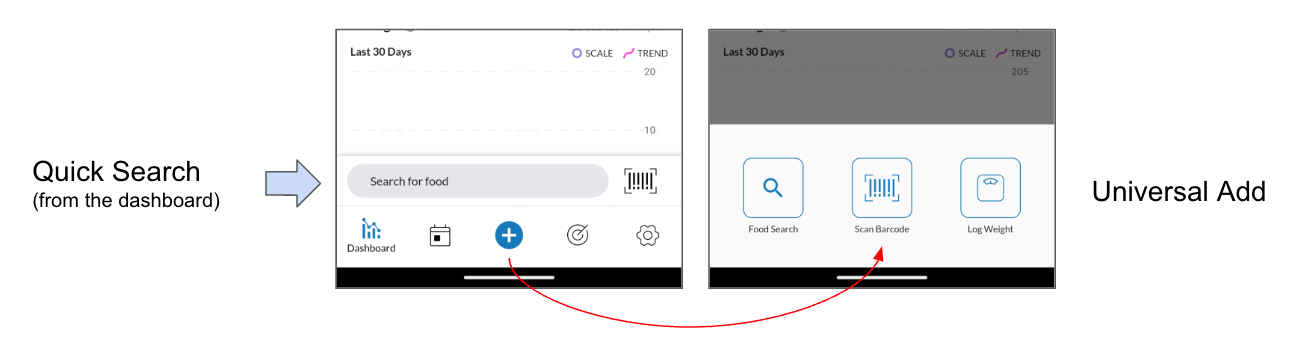
From the dashboard you can use Quick Search to instantly search for a food by name or barcode scan without first drilling down into the meal you're adding to. Quick Search allows you to add to today's meals and it will remember the name of the last meal that you added to for one hour so you can quickly log foods without re-selecting your target meal each time.
We plan to build upon this new pattern to enable logging foods from home screen widgets, smart watches, and more. And don't worry: We didn't take away the old food logging flow with the + button next to each meal name. That's still there alongside this new logging method.
With Universal Add (the big + button), you can more easily log body weight or food from any screen. We'll be adding more things to log like biometrics, AI voice search, and more.
Finally, with the new navigation we also reorganized the app:
Daily Goals now live in the bottom nav (previously they were in Profile > Goals
Saved Foods, Meals, and Recipes now live in Profile > Saved Foods, Meals, and Recipes (previously they were in the bottom navigation named My Kitchen)
Nutrition and Body Weight Trends now live on the Dashboard (previously they were in Profile > Trends)
01. Feb 2024
Share
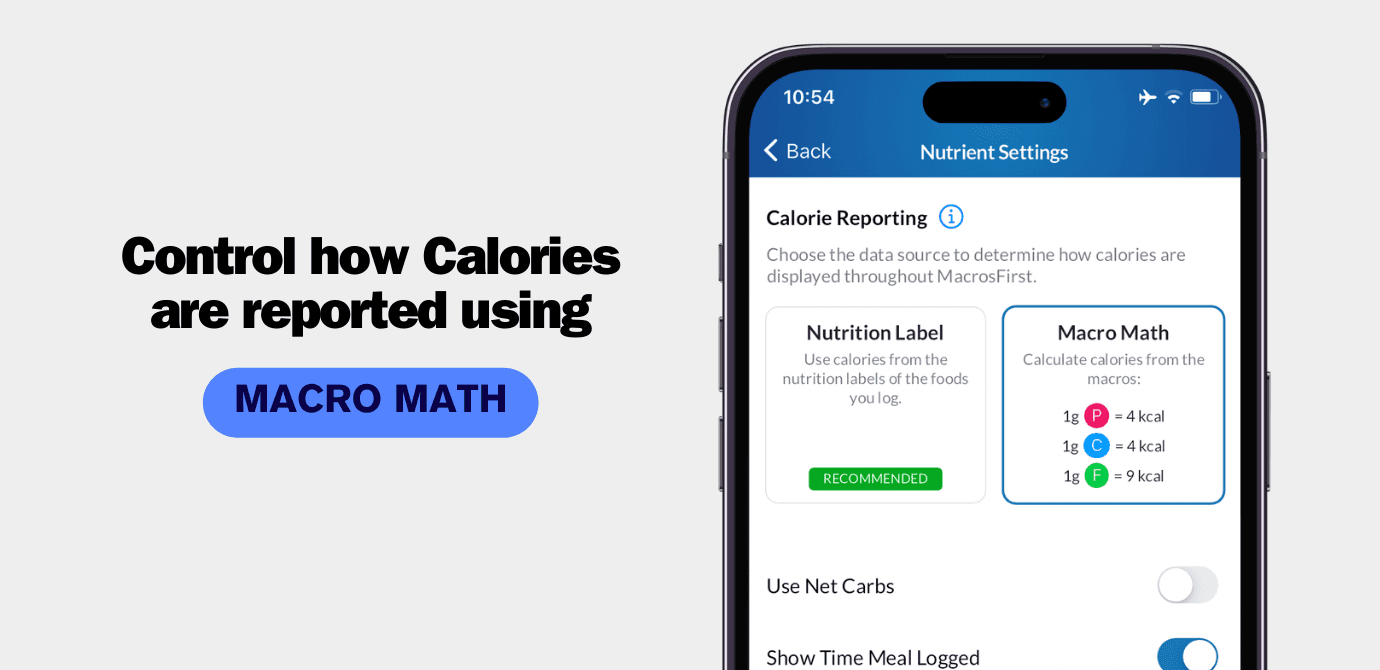
In general, 1g of protein contains 4 calories, 1g of carbohydrates contains 4 calories, and 1g of fat contains 9 calories. However, you may have noticed on food nutrition labels or when tracking in MacrosFirst, or any other app for that matter, that calories do not always perfectly match the macros as you may expect them to.
There are many good reasons for this including the differing caloric content of fiber vs. regular carbs, calories from alcohol, and nutrition label rounding and margin of error and so we wrote a whole article on the subject.
However, despite our best efforts to explain why calories can differ from macros consumed we still receive complaints like this one every now and then where folks believe they've encountered a bug in MacrosFirst:

One of our core principles at MacrosFirst is to empower our community to take control over their nutrition and we do this by meeting our users where they're at and delivering tools that build confidence and lead towards positive change.
For this reason we're excited to introduce Macro Math as a new setting in MacrosFirst where you can control how calories are calculated and reported upon throughout MacrosFirst. For more on Macro Math and the new Calorie Report setting, checkout this help center article.
16. Jan 2024
Share
In mid-December we released an update to the food logger which made it faster to log multiple items at once to your meals. However, when adding a single food to your meal it also introduced one additional tap.
The feedback on this update was decidedly mixed. Those who build meals with several foods at once loved it for the efficiency gains while those who log one food at a time were upset about the extra tap.
Now, after engaging with our community in the MacrosFirst Facebook group and extensive beta testing, we're pleased to release an update to the food logger that preserves fast multi-food logging and single food logging.
In version 2.1.34 (1309) of MacrosFirst, you will find two new buttons at the bottom of the Food Search and Food Detail screens.
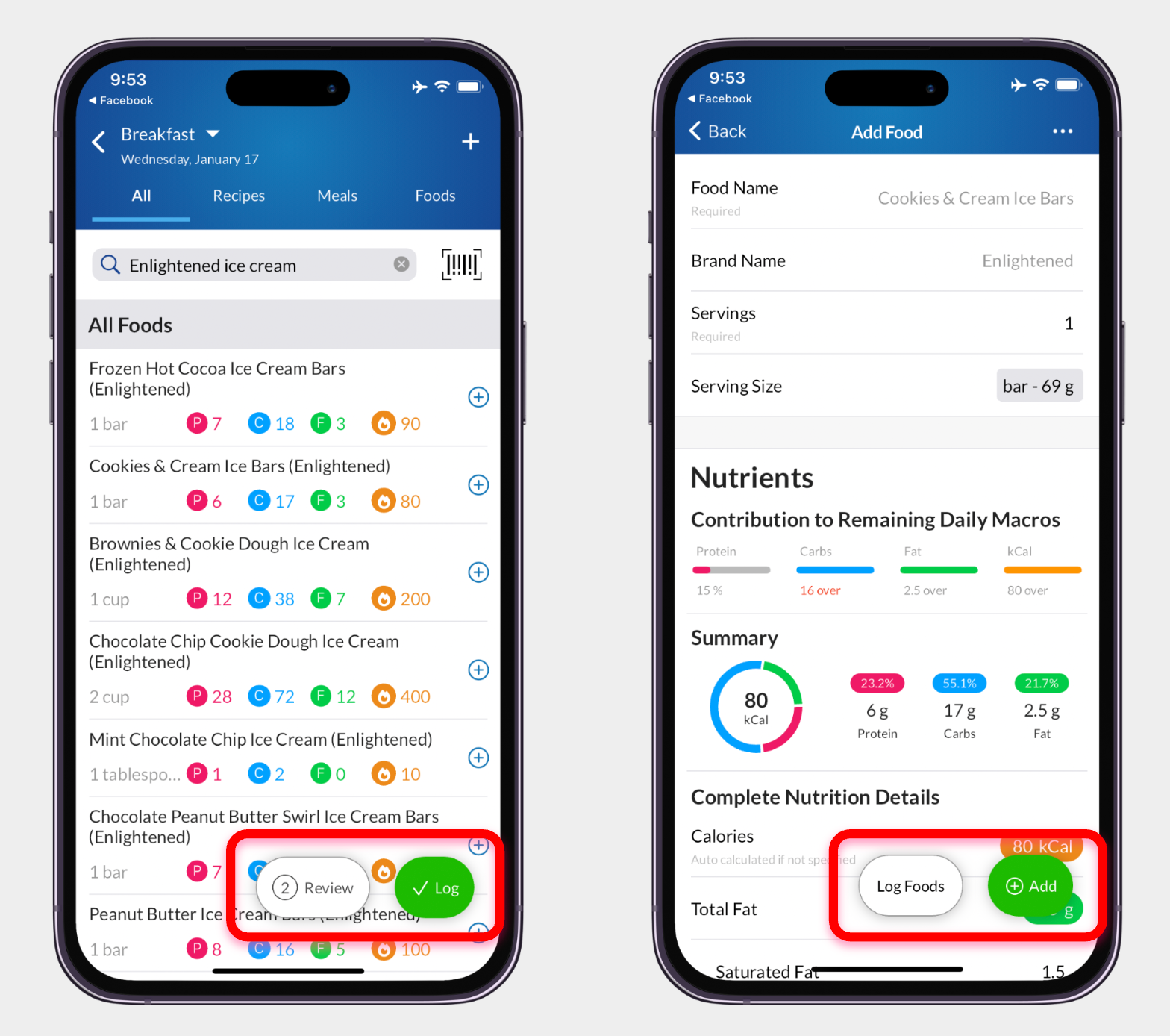
On the Food Search page, after you select a food to add to your meal, two buttons will appear at the bottom of the screen.
Tap Log to log all of the foods you've selected, exit food search, and return to the day, meal, or recipe that you are adding to.
Tap Review to see all of the foods that you've selected, the complete nutrition summary of those foods as well as their contribution to your daily goal, and make any serving size adjustments prior to logging.
On the Add Food, or food detail screen, two similar buttons will appear at the bottom of the screen.
Tap Log Foods to log this food, as well as any previously selected foods, to the day, meal, or recipe that you are adding to and return there.
Tap Add to add this food to your selected foods list and return you to food search so that you can search for other items to add to your meal.
We're grateful to everyone in our community who shared their feedback and worked with us to arrive as this solution which makes logging foods faster for all.
21. Nov 2023
Share
In this update we fixed a handful of small bugs including:
A funky issue experienced in your daily log when navigating to Saturdays where the day picker would jump to a different week
Calories were missing from the search results tablewhen searching among saved foods in My Kitchen
A rare issue where the order foods in a meal would sometimes change when copying a meal from one day.